Connect Your Blog to Facebook Automatically

FacebookIcon Connect Your Blog to Facebook Automatically

UPDATE: From Karen, January 21, 2012 

Unfortunately, Facebook has disabled this process as of September 2011 and it no longer works. We have to post a link to our blogs in the status or copy and paste as a rich text note.

From Patsi, February 2012: We apologize for not updating this post earlier, but things change constantly on the Web, and Facebook is notorious for it’s constant shifts. I no longer update any social media automatically, but am posting manually (read why here, Say NO to Auto-Feeds: Your Blog & Facebook, Social Sites). This is time-consuming and may require a virtual assistant for some of you. I recommend SerenityVA.com.

Guest Post from AnnaLaura Brown:

Are your blog posts fed automatically into Facebook?

The other day I was horrified to learn that a dear client was manually posting his blog articles to Facebook. Yikes! No wonder blogging seems tiresome and time-consuming.

I took my pencil and rapped him on the knuckles, gave him a virtual scowl and promised to write a post about how to do this. It had been so long since I set this up myself, I was a bit rusty on the steps required. So I asked Facebook expert Annalaura Brown to write this guest post.

How to Automatically Link Blog Posts to Facebook

Automatically linking your blog posts to Facebook, Twitter, and Linkedin can get you some great publicity and traffic but it can be challenging to figure out how to make it all work. Fortunately you have a couple of different options for each one.

Facebook

1.       Use the networked blogs application. This is my personal favorite.  To get started type in networked blogs into the search box and you will pull up the application.
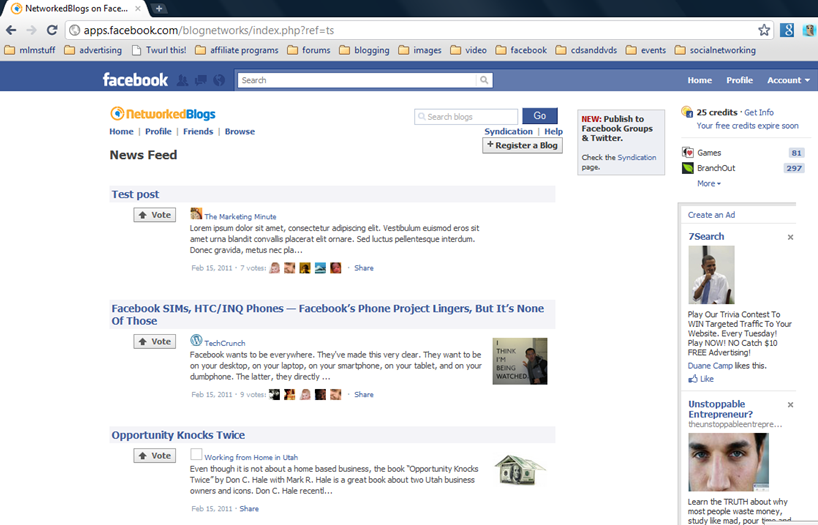
FBnetworkedblogs Connect Your Blog to Facebook Automatically

You click on the ‘register a blog‘ link you see in the capture photo above and it will walk you through the process.  The first time you will have a few extra steps to complete to verify that you are the blog owner but after that you can register as many blogs as you own.

Networked Blogs also gives you the option to post to your FB profile, your fan page or fan pages or to Twitter as well.  You can choose one or all of the options.

2.   Use the FB notes application.  It works the same way for both profiles and fan pages. You click on the notes application.
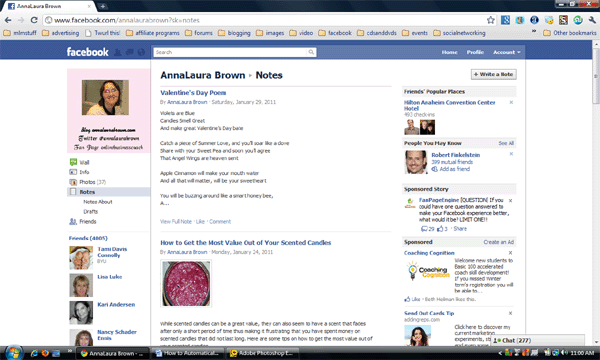
FBnotes11 Connect Your Blog to Facebook Automatically

Then click on the ‘write a note‘ button in the far right hand top . You will see this screen.
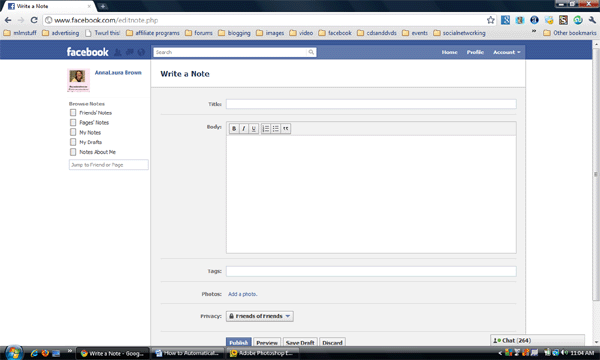
FBnotes21 Connect Your Blog to Facebook Automatically

Then you have to click on the ‘my notes‘ page which gives you this screen.
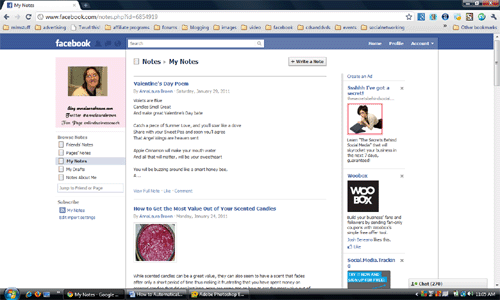
FBnotes31 Connect Your Blog to Facebook Automatically

Then you click on the ‘edit import settings‘ link that appears in blue under the subscribe text.
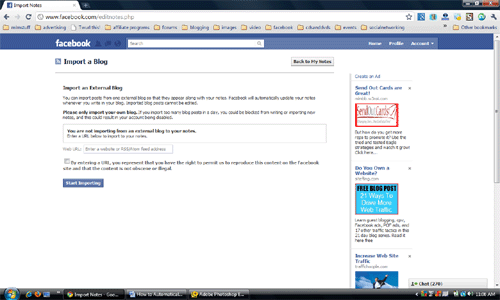
FBnotes41 Connect Your Blog to Facebook Automatically

You can then enter in the RSS feed of your blog into the box and every time you post a new blog post, it will be auto imported into the notes on FB and appear as a new FB note.

About AnnaLaura Brown: AnnaLaura Brown is an online marketer who enjoys making money online and teaching others to do the same. She offers a free social media mastery kit at her website www.internetworkmarketingwealth.com. Become a fan on her fan page at www.facebook.com/onlinebusinesscoach.

Related posts:

  1. Why Use Twitter, Facebook & LinkedIn for
    Content Marketing?
  2. 10 Ways to Use Facebook as a List Building Tool
  3. Feed Your Blog Automatically to LinkedIn & Twitter
  4. Facebook Fan Page: Top 5 Reasons to Have One
  5. Say NO to Auto-Feeds:
    Your Blog & Facebook, Social Sites
13 Responses to Connect Your Blog to Facebook Automatically
  1. [...] This post was mentioned on Twitter by Patsi Krakoff, Tony Karrer. Tony Karrer said: Connect Your Blog to Facebook Automatically http://bit.ly/h1JDag [...]

  2. Velda Brotherton
    February 18, 2011 | 3:31 pm

    Patsi, thanks so much for all the information you provide. I just wanted to let you know that those who use Blogger can share to Twitter, Facebook, Google Buzz and Google Talk simply by clicking on the share button at the top of their posted blog. That will bring up a window and it’s simple to follow instructions and automatically get your blog on those four sites if you have an account there. It’s a new addition to Blogger.

  3. Sue Worthington
    February 18, 2011 | 9:21 pm

    It is so easy to assume that people know these things, and I kept getting questions about connecting various sites together and also what plugins and buttons to use on all these sites. That’s why I created my spiders web!!
    Hope it helps some
    Regards
    Sue
    Sue Worthington´s last [type] ..Welcome to the Web!

  4. [...] How do you get your blog posts to feed into your LinkedIn profile and Twitter automatically? I asked social media expert AnnaLaura Brown to write a guest post. This is the 2nd part of her post Connect Your Blog to Facebook. [...]

  5. Kerwin
    March 2, 2011 | 10:01 am

    Awesome information AnnaLaura…I just updated FB notes with my blog rss feed. Up until now, I never really used FB notes for anything. Thanks for these tips and I will re-post on my fanpage.
    Kerwin´s last [type] ..Seven MUST KNOWS Part 6 – You Need To Have A Cash Flow Strategy

  6. Haley
    August 6, 2011 | 6:52 pm

    AWESOME!!! I kept trying to figure out how to do this…and boom here it is!! Thanks so much! Oh how I love simplicity!

  7. Maria
    August 17, 2011 | 1:03 am

    Thanx Anna, very helpful info. Do u know of a method to connect linkedin to my blog posts?

  8. daddydrew
    August 17, 2011 | 6:53 pm

    well the blog link worked idiot proof- the twitter not so well

  9. Leslie
    August 19, 2011 | 10:15 am

    I’m a complete novice. Can you please answer this?! I use windows live writer with a blog on blogger.
    1. can I use this networked blogs application? I’m so confused about plugins vs. applications.
    2.Also, what is my RSS feed? Is this the same as URL?
    3. Will I be able to upload some past posts on facebook?
    I’m so desperate for help. Thank you.

  10. Patsi Krakoff
    August 19, 2011 | 11:00 am

    Leslie, don’t despair, blogging can get a little confusing at first. Some basic training and instructions would probably help you. There’s plenty of free information online, just google your questions, people are always helpful. Try my free ebook, http://www.ContentMarketingwithBlogs.com.

  11. Simon
    October 17, 2011 | 5:01 pm

    “Networked Blogs also gives you the option to post to your FB profile, your fan page or fan pages or to Twitter as well. You can choose one or all of the options”.
    My blog posts only to my profile and I can’t find an option to switch it to my fan page. This is really frustrating, help please.
    Thanks

  12. Karen
    January 21, 2012 | 7:44 pm

    Unfortunately, Facebook has disabled this as of September 2011 and it no longer works. We have to post a link to our blogs in the status or copy and paste as a rich text note.

  13. Jana
    February 14, 2012 | 11:34 pm

    It would be *really* helpful if that last comment were pasted at the top of this article along with “UPDATE: PLEASE READ.” I just wasted 15 minutes or so trying to figure out why this wasn’t working. :(

Leave a Reply

Wanting to leave an <em>phasis on your comment?

CommentLuv badge
Trackback URL http://writingontheweb.com/2011/02/18/connect-your-blog-facebook-twitter-linkedin/trackback/